Bot Protection
Overview
The Bot Protection setting enables protection against automated and malicious bot traffic. It helps safeguard the application by filtering suspicious requests and reducing unwanted load on the system.
Configuration Details
- BotProtection (Value: 100): Defines the protection threshold or sensitivity level for detecting bot traffic. Higher values enforce stricter filtering, while lower values allow more lenient traffic handling.
- Dropdown Selector: Allows the user to select the desired protection level based on application requirements and traffic patterns. This has to be adjusted based on your traffic.
- Enable Button: Activates the Bot Protection feature with the configured value. Once enabled, incoming requests are evaluated against the defined threshold.
Functionality
When enabled, the system monitors incoming requests and applies filtering rules to identify and block potentially harmful or automated traffic. This helps in maintaining application availability and performance.
Use Cases
- Protecting public-facing applications from automated attacks
- Reducing spam or excessive request traffic
- Enhancing overall application security posture
Enable Bot Protection
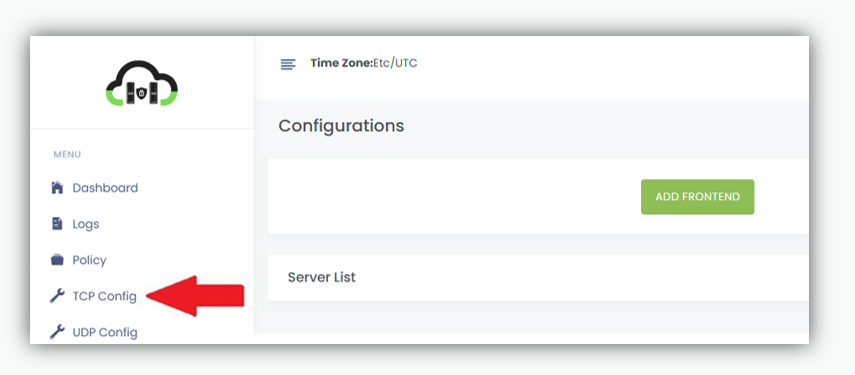
- Navigate to TCP Config.
Click on TCP Config from the left navigation menu.
- Locate the required frontend server from the list for which you want to enable Bot Protection.
- Click on Enabe button next to the Bot Protection option.
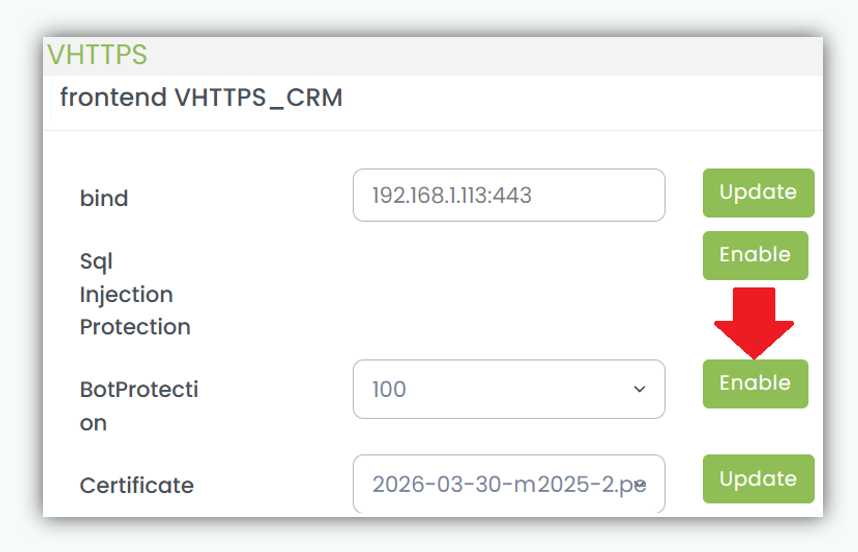
Click Enable Once enabled, Bot Protection is activated for the selected frontend server and begins monitoring and controlling bot generated traffic based on the configured policy.